
FAQ
How ranking works, where to report a driver and what each in-game app shows.
How does ranking work?
Every driver has a Rating and a Reputation. Rating shows how well you do in races, Reputation shows how safe a driver you are and how often you are involved in incidents.
Rating uses the Elo system. For example, beating a higher-rated driver gains you more Rating than beating a lower-rated one, and losing to a lower-rated driver costs more.
Reputation is for clean driving: fewer incident points per lap raises it.
Where do I report a bad driver?
On our Discord. Describe what happened and, if you can, add a recording. If a driver gets several reports, we decide on a ban.
A video makes a report much easier to judge, so record your races. We recommend Steam’s game recording, so you never miss the moment. Turn it on in Steam > Settings > Game Recording.
UI apps explained
BeamSimRacing has its own UI apps. What each of them does is described below.
When we add a new app or change the size of one, your app layout resets to our default the next time you join. If you had moved apps around, you will need to place them again.
Leaderboard
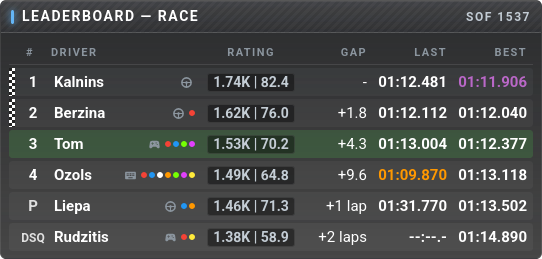
Shows everyone in the current session: gap to the leader, last and best lap times, whether a driver is in the pits (P) or disqualified (DSQ), each driver’s Rating and Reputation, and the strength of field (SOF). It also shows what each driver controls the car with (keyboard, gamepad or wheel) and which assists, if any, they have on.
Assist symbols and colors explained:
- Keyboard
- Gamepad
- Wheel
- ABS: arcade
- Gearbox: arcade
- Gearbox safety
- Clutch assistant
- Throttle assistant
- Oversteer reduction
- Understeer reduction
If you see no dots next to a driver’s name, that driver is not using any assists.
Relative
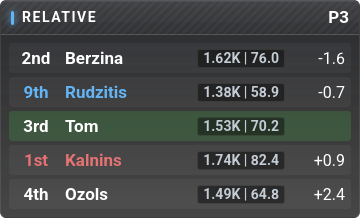
Shows the cars nearest to you. A blue name is a car you are lapping, a red one is lapping you.
Race Info
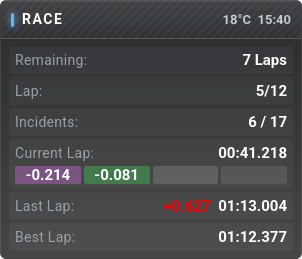
Displays the outside temperature, time of day, race time or laps left, your current lap, your incident points, current lap time and your best lap time. The bars under the current lap are its sectors: purple is the fastest anyone has driven it this session, green beats your own best, yellow is slower and red means the lap is invalid. The number is the gap to your best.
Pit stop
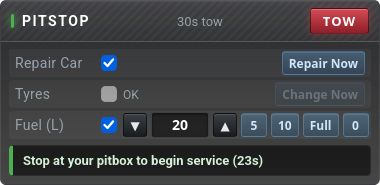
Pick the service before you come in: repair, tires, or how much fuel to put in. Stop in your pit box and it starts automatically; the bar at the bottom shows the time left. Use TOW to bring yourself back to your pit box if you are stuck or need to repair the car.
Flags

Shows flags depending on the situation.
Start lights

Indicates the race start. Go on green.
Notifications
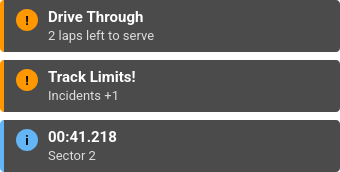
Shows when you breach track limits, get incident points, and other useful info.
Fuel gauge
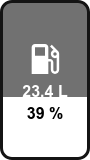
Shows how much fuel the car has left.
Radar
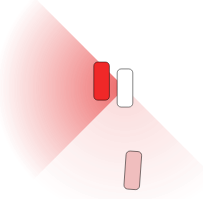
Shows the cars within 15 meters of you and stays hidden when nobody is near. Cars turn red the closer they get, and the side they are on glows red.
Dash

A small dash with shift lights, speed, gear and gearbox type. The lights fill from both ends toward the middle as the revs rise. When the whole strip flashes blue, shift up.
Input Telemetry
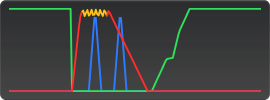
Shows your throttle (green), brake (red), clutch (blue) and handbrake (brown) over the last 6 seconds. The brake line turns yellow while ABS is working. It shows what you press, before any driving assist.